Prices for all 9 Mac Studio M5 configurations (VAT included)
Mac Studio M5 Max starts at 77,780,000₫, M5 Ultra at 177,780,000₫. Each card shows the best AI model it can run with its AA score — filter by chip, RAM or the model you need.
Compare configurationsCompare the Mac Studio chips side by side, or tick “Compare” on any card (up to 4 machines, Mac Studio and Mac mini can be mixed).
Prices include VAT. SSD upgrades cost extra — choose them on each machine's detail page. Specifications as published by Apple, updated September 24, 2026.
Compare 9 configurations at a glance: RAM, bandwidth and AI model
| Configuration | CPU / GPU | Memory | Bandwidth | Best model (AA score) | Price |
|---|---|---|---|---|---|
| M5 Max 18/32 · 36GB | 18 / 32 cores | 36GB | 460GB/s | Qwen3.8-27B · AA score 20.1 | 77,780,000₫ |
| M5 Max 18/40 · 48GB | 18 / 40 cores | 48GB | 614GB/s | Qwen3.8-27B · AA score 20.1 | 96,120,000₫ |
| M5 Max 18/40 · 64GB | 18 / 40 cores | 64GB | 614GB/s | Qwen3.8-27B (8-bit) · AA score 20.1 | 108,340,000₫ |
| M5 Max 18/40 · 128GB | 18 / 40 cores | 128GB | 614GB/s | Qwen3.8-27B (8-bit) · AA score 20.1 | 157,230,000₫ |
| M5 Ultra 30/64 · 96GB | 30 / 64 cores | 96GB | 1.2TB/s | Qwen3.8-27B (8-bit) · AA score 20.1 | 177,780,000₫ |
| M5 Ultra 30/64 · 256GB | 30 / 64 cores | 256GB | 1.2TB/s | GLM-5.3-Flash · AA score 27.8 | 300,000,000₫ |
| M5 Ultra 36/80 · 96GB | 36 / 80 cores | 96GB | 1.2TB/s | Qwen3.8-27B (8-bit) · AA score 20.1 | 217,500,000₫ |
| M5 Ultra 36/80 · 256GB | 36 / 80 cores | 256GB | 1.2TB/s | GLM-5.3-Flash · AA score 27.8 | 339,720,000₫ |
| M5 Ultra 36/80 · 512GB | 36 / 80 cores | 512GB | 1.2TB/s | GLM-5.3-Flash · AA score 27.8 | 691,100,000₫ |
Memory bandwidth determines how fast the machine generates text. GPU core count determines how quickly it processes a long prompt before it starts answering.
How much RAM do you need for which AI model?
How much RAM you need to run an LLM locally depends on the model you need: the 36GB version runs Qwen3.8-27B · AA score 20.1 at best, the 512GB version runs GLM-5.3-Flash · AA score 27.8. Memory capacity decides which model fits, the AA score shows how smart that model is, and memory bandwidth decides how fast it runs. The table below lists the best model each memory tier can run.
| System memory | Available to the model | Best model it can run (AA score) | Best for |
|---|---|---|---|
| 36GB | ~27GB | Qwen3.8-27B · AA score 20.1 | Assistant for Q&A over internal documents, summarizing and drafting for a small team |
| 48GB | ~36GB | Qwen3.8-27B · AA score 20.1 | As above, with headroom for longer context and more people asking at once |
| 64GB | ~48GB | Qwen3.8-27B (8-bit) · AA score 20.1 | Runs the 8-bit version (lighter quantization than 4-bit), several tasks in parallel |
| 96GB | ~72GB | Qwen3.8-27B (8-bit) · AA score 20.1 | Same model on the higher-bandwidth M5 Ultra — long documents, many concurrent users |
| 128GB | ~96GB | Qwen3.8-27B (8-bit) · AA score 20.1 | Same model, with spare memory for long context or an additional model |
| 256GB | ~192GB | GLM-5.3-Flash · AA score 27.8 | A clearly smarter model, or several models at once on one machine |
| 512GB | ~384GB | GLM-5.3-Flash · AA score 27.8 |
Memory available to the model ≈ 75% of RAM (the macOS default for graphics). AA score: Artificial Analysis Intelligence Index v5.0, checked 3 Nov 2026 — higher means smarter; the v5 scale is harder, so scores are lower than before. For comparison, Claude Opus 5.5 scores 58.4 and the leader, Gemini 4 Carbon, scores 59.4. Response speed and the number of simultaneous users depend on the GPU and memory bandwidth; Namtech tests on real hardware before advising.
Mac Studio M5 Max or M5 Ultra: which should you choose?
Choose M5 Max when Qwen3.8-27B (8-bit) · AA score 20.1 (the best model on the 128GB version) is enough for the job and you have a moderate number of users. Choose M5 Ultra when you need a smarter model (the 512GB version runs GLM-5.3-Flash · AA score 27.8), longer context or many people querying at once — Ultra has roughly double the memory bandwidth and GPU cores.
| M5 Max | M5 Ultra | |
|---|---|---|
| CPU / GPU | 18 / 32/40 cores | 30/36 / 64/80 cores |
| Neural Engine | 16 cores | 32 cores |
| Unified memory | 36–128GB | 96–512GB |
| Memory bandwidth | 460GB/s/614GB/s | 1.2TB/s |
| Best model it can run (AA score) | Qwen3.8-27B (8-bit) · AA score 20.1 | GLM-5.3-Flash · AA score 27.8 |
| Price (VAT included) | 77,780,000₫ – 157,230,000₫ | 177,780,000₫ – 691,100,000₫ |
Bandwidth determines how fast text is generated; GPU core count determines how quickly a long prompt is processed. Chip, RAM and bandwidth figures as published by Apple, checked September 24, 2026.
Mac Studio vs an RTX 5090 PC, NVIDIA DGX Spark and AI servers
No single machine is best for every workload. The key differences are how much memory a single machine has for the model, where the machine sits, and the software ecosystem. The table below is a qualitative comparison, not a speed benchmark.
| Option | Memory for the model | Strengths | Considerations |
|---|---|---|---|
| Mac Studio M5 Max / M5 Ultra | 36–512GB unified memory | The 512GB version runs GLM-5.3-Flash · AA score 27.8 on one machine; 480W maximum continuous power rating; sits on a desk | Slower than dedicated GPU systems at processing very long context |
| RTX 5090 discrete-GPU PC | 32GB of graphics memory per card (NVIDIA) | Suits models that fit in 32GB; many AI tools are written for NVIDIA first | Larger models need multiple cards, which draw more power and need more cooling |
| NVIDIA DGX Spark | 128GB unified memory (NVIDIA) | Compact desktop that runs the NVIDIA software ecosystem | Less memory than the 512GB option on Mac Studio M5 Ultra |
| Multi-GPU AI server | Depends on the number of cards installed | Strongest when many people query at once with very long context | Needs a server room, rack and dedicated cooling; high capital and power costs |
RTX 5090 and DGX Spark memory figures are taken from NVIDIA’s official product pages, checked on September 24, 2026.
What to consider before you decide
Mac Studio is strong at generating text thanks to its high memory bandwidth, but for reading and understanding very large amounts of text (for example, feeding an entire set of files into every question), dedicated GPU systems are still faster. If your workload leans toward many people asking at once with very long context, let us know and we will test it before you buy.
When Mac mini is enough, and when you need Mac Studio
Mac mini is enough when
You are just trying out local AI or using it personally, mainly summarizing and drafting short documents. Mac mini suits testing or personal use, not as the AI server of a Namtech internal-AI package.
Move up to Mac Studio when
You need large models, long context, many people asking at once, or several models on one machine. Mac Studio offers 36–512GB of memory.
The lowest-priced Mac mini configuration is the Mac mini M6 12CPU 12GPU 16GB 256GB at 27,780,000₫, whose best model is gpt-oss-20b · no AA v5 score yet. Mac mini offers 16–64GB of memory.
Our advice is straightforward: if a Mac mini is enough for your workload, Namtech will tell you before you spend money on a Mac Studio.
On-premise AI deployment: your data stays in the office
On-premise AI means the model runs on a machine located at your company. Questions, documents and answers all stay on your internal network — the foundation for an internal chatbot, a Q&A assistant over your document library, file summarization and drafting.
Unified memory
The CPU and GPU share one pool of memory. No need to split a model across multiple graphics cards, and no overhead syncing between cards.
Fits in an office
9.5 cm tall, 2.7–3.6 kg, runs quietly. No server room, no rack, no dedicated cooling system required.
Low power draw
Maximum continuous power rating of 480W for the whole machine; per Apple, measured maximum consumption is about 200W (M5 Max 18/32) to 385W (M5 Ultra 36/80). A multi-GPU system with comparable memory typically draws several times more, adding to power and cooling costs.
Your data stays in-house
The model runs locally and makes no calls to outside services. Suitable for HR records, contracts, customer data and internal documents.
Genuine machines and accessories are sold and VAT-invoiced by Công ty Cổ phần Trạm Năng Lượng Số; Namtech advises on the configuration and can install and tune the software that runs your models (MLX, Ollama or LM Studio) to your requirements (quoted separately).
Buying from Namtech vs buying directly from Apple Store
| Buy from Namtech | Buy directly from Apple Store | |
|---|---|---|
| Payment | Only a 20% deposit when the order is confirmed; the remaining 80% is paid before delivery | Full payment when ordering, even if you wait weeks for stock |
| Cancellation | Cancel before the order is confirmed: free of charge | Cancel once the order is being prepared for shipping: 20% restocking fee |
| AI advice and setup | Configuration advice based on the AI models you plan to run, help installing MLX, Ollama, LM Studio | Not offered |
| Delivery | Delivered to your door, factory-sealed; you open the seal yourself | Free delivery |
| Invoice | VAT invoice issued by Công ty Cổ phần Trạm Năng Lượng Số | Apple invoice |
| Warranty and returns | Per Apple’s policy | Per Apple’s policy |
Specifications common to all configurations
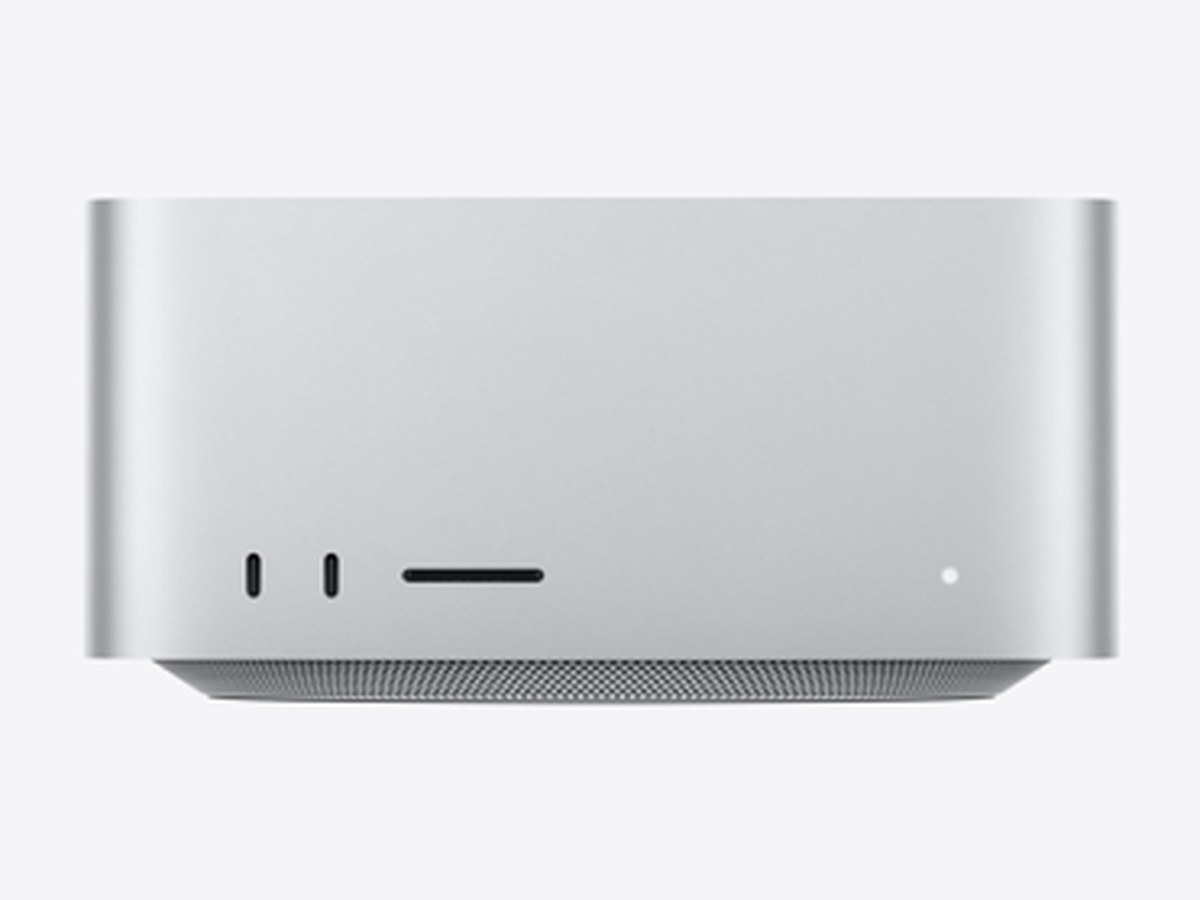
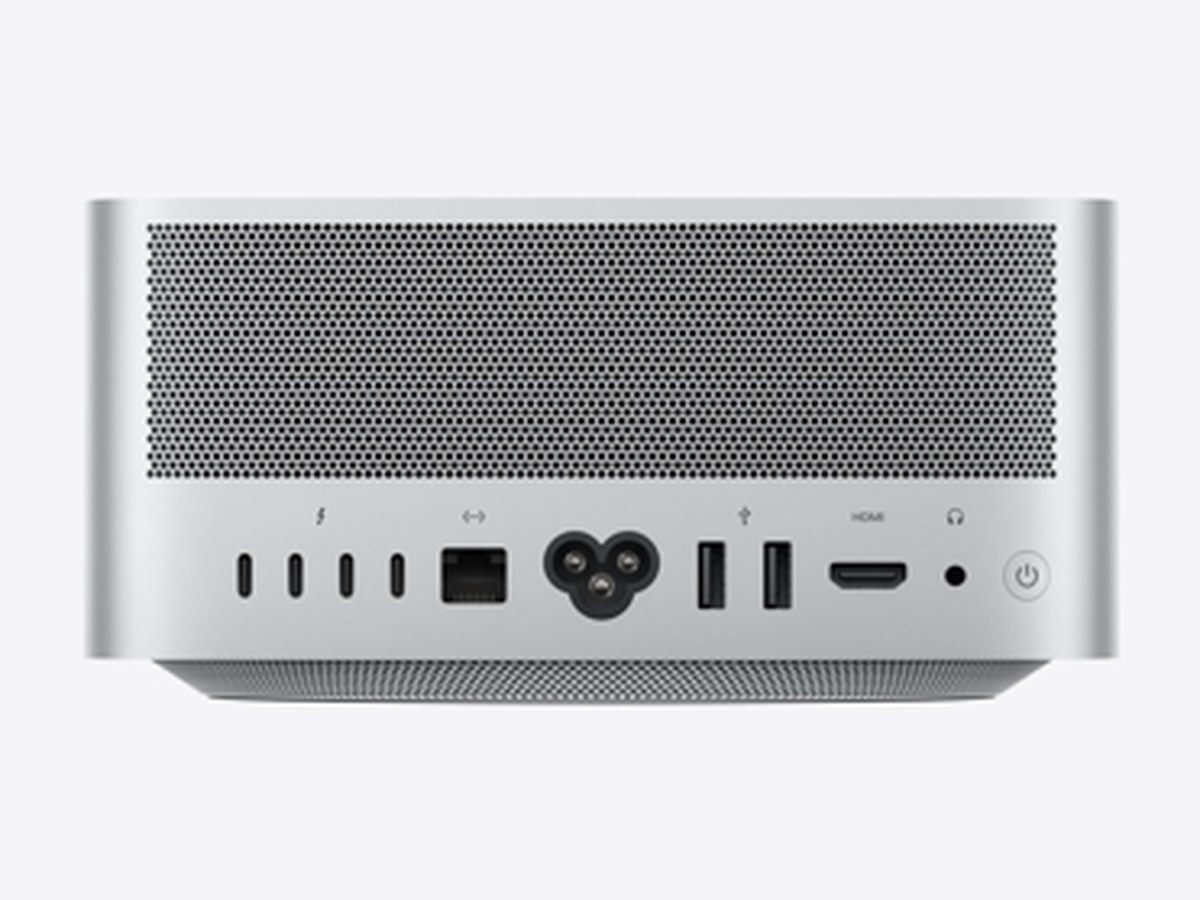
| Ports | 4× Thunderbolt 5 (USB-C, up to 120Gb/s, DisplayPort 2.1) · 2× USB-A (up to 5Gb/s) · 1× HDMI 2.1 · 1× 10Gb Ethernet (Nbase-T, RJ-45) · 3.5 mm headphone jack · Front: SDXC card slot (UHS-II) + 2× USB-C 10Gb/s (M5 Max) or 2× Thunderbolt 5 (M5 Ultra) · Wi-Fi 7 (802.11be), Bluetooth 6, Thread — Apple N1 chip |
|---|---|
| Display support | M5 Max: up to 5 external displays · M5 Ultra: up to 8 external displays (6K@60Hz) |
| Dimensions | Height 9.5 cm · Width 19.7 cm · Depth 19.7 cm |
| Weight | 2.7 kg (M5 Max) · 3.6 kg (M5 Ultra) |
| Power | 100–240V AC, maximum continuous power 480W · operating temperature 10–35°C |
| In the box | Mac Studio and power cord. Display, keyboard and mouse sold separately. |
Source: Apple’s official technical specifications, checked on September 24, 2026.
Mac Studio for local AI: frequently asked questions
What hardware do you need to run AI locally?
The most important factor is enough memory to hold a model that is smart enough for the job, followed by memory bandwidth. The lowest-priced Mac Studio on this page (36GB, 77,780,000₫) runs Qwen3.8-27B · AA score 20.1 at best; the 512GB version runs GLM-5.3-Flash · AA score 27.8. AA score: Artificial Analysis Intelligence Index v5.0, checked 3 Nov 2026 — higher means smarter; the v5 scale is harder, so scores are lower than before. For comparison, Claude Opus 5.5 scores 58.4 and the leader, Gemini 4 Carbon, scores 59.4. Response speed and the number of simultaneous users depend on the GPU and memory bandwidth; Namtech tests on real hardware before advising.
How much RAM do you need to run an LLM locally?
It depends on the model you need. The best model each Mac Studio memory tier can run: 36–48GB: Qwen3.8-27B (AA score 20.1); 64–128GB: Qwen3.8-27B (8-bit) (AA score 20.1); 256–512GB: GLM-5.3-Flash (AA score 27.8). AA score: Artificial Analysis Intelligence Index v5.0, checked 3 Nov 2026 — higher means smarter; the v5 scale is harder, so scores are lower than before. For comparison, Claude Opus 5.5 scores 58.4 and the leader, Gemini 4 Carbon, scores 59.4.
What is the best AI model Mac Studio can run?
The 256GB version runs GLM-5.3-Flash · AA score 27.8; GLM-5.3-Flash at 4-bit takes about 156.8–204 GB, MIT licence. The 64–128GB versions run Qwen3.8-27B (8-bit) · AA score 20.1; Qwen3.8-27B at 8-bit takes about 29.5 GB, Apache 2.0 licence. The 36–48GB versions run Qwen3.8-27B · AA score 20.1; Qwen3.8-27B at 4-bit takes about 16.1 GB, Apache 2.0 licence. The lowest-priced configuration that runs GLM-5.3-Flash is the Mac Studio M5 Ultra 30CPU 64GPU 256GB 1TB at 300,000,000₫ (VAT included). AA score: Artificial Analysis Intelligence Index v5.0, checked 3 Nov 2026 — higher means smarter; the v5 scale is harder, so scores are lower than before. For comparison, Claude Opus 5.5 scores 58.4 and the leader, Gemini 4 Carbon, scores 59.4.
What hardware do you need to run DeepSeek locally?
It depends on which version of DeepSeek you plan to run. The smaller distilled versions run on machines with less RAM; the full DeepSeek model does not fit in the 512GB memory of a single machine at 4-bit, so it needs heavier quantization or several machines linked together. Send us the specific model name and Namtech will test it on real hardware and map it to a suitable configuration.
How much do Mac Studio M5 Max and M5 Ultra cost?
Mac Studio M5 Max is priced from 77,780,000₫ to 157,230,000₫, and M5 Ultra from 177,780,000₫ to 691,100,000₫ with default storage. Prices include VAT; the machines are sold and VAT-invoiced by Công ty Cổ phần Trạm Năng Lượng Số, and Namtech advises on choosing a configuration for the AI models you need to run. SSD upgrades cost extra — choose them on each machine's detail page.
What is the difference between Mac Studio M5 Max and M5 Ultra?
M5 Ultra offers roughly twice what M5 Max does where it matters for AI: memory bandwidth of 1.2TB/s vs 460GB/s or 614GB/s, a 64- or 80-core vs 32- or 40-core GPU, and a 32-core vs 16-core Neural Engine. M5 Max has 36–128GB of memory (best model Qwen3.8-27B (8-bit) · AA score 20.1); M5 Ultra has 96–512GB (up to GLM-5.3-Flash · AA score 27.8).
What models can Mac Studio 96GB and 256GB run?
The 96GB version runs Qwen3.8-27B (8-bit) · AA score 20.1 at best, the 256GB version runs GLM-5.3-Flash · AA score 27.8. The 96GB version suits teams that need the high-bandwidth M5 Ultra for many concurrent users; the 256GB version suits a smarter model or running several models at once. Prices: 96GB version 177,780,000₫ – 217,500,000₫; 256GB version 300,000,000₫ – 339,720,000₫, VAT included.
Mac Studio or an RTX 5090 PC: which is better for AI?
It depends on the model size. According to NVIDIA, the RTX 5090 has 32GB of graphics memory, so models larger than that need multiple cards or run more slowly. Mac Studio uses up to 512GB of unified memory — the 512GB version runs GLM-5.3-Flash · AA score 27.8 on one machine — with a maximum continuous power rating of 480W (per Apple, measured maximum consumption is about 200W–385W depending on configuration). Conversely, for models that fit in 32GB and tools written specifically for NVIDIA, an RTX 5090 PC is worth considering.
How does Mac Studio compare with NVIDIA DGX Spark?
Both are desktop machines with unified memory. According to NVIDIA, DGX Spark has 128GB of unified memory; Mac Studio M5 Ultra offers a 512GB option, holding larger models on one machine. DGX Spark has the advantage of running NVIDIA's software ecosystem. Mac Studio runs macOS, sits neatly in an office and can be used as an ordinary work computer.
Can a Mac mini run local AI?
Yes, for testing or personal use. Mac mini suits testing or personal use, not as the AI server of a Namtech internal-AI package. When you need large models, long context or many people asking at once, move up to Mac Studio, which offers 36GB to 512GB of memory. Namtech gives straightforward advice: if a Mac mini is enough for your workload, we will tell you.
What is on-premise AI, and how is it different from cloud AI?
On-premise AI is an AI model running on a machine located at your company, with no questions or documents sent to outside services. Cloud AI is the opposite: data passes through the provider's servers and is usually billed per use. On-premise suits HR records, contracts and customer data; the trade-off is a one-time hardware investment that your business manages itself.
Can Mac Studio run an internal chatbot?
Yes. Mac Studio can run a Q&A assistant over your internal document library for staff on the company network, with no data leaving. The machine itself is standard, unmodified Apple hardware; Namtech can install and tune the software that runs your models (MLX, Ollama or LM Studio) to your requirements, quoted separately based on the scope of work.
Can I upgrade the RAM after purchase?
No. Mac Studio memory is built into the chip, so you must choose the right amount when you order. That is why you should work out the models you plan to run before settling on a configuration.
Is a VAT invoice issued?
Yes. Prices listed on this page include VAT. Machines and accessories are sold by Công ty Cổ phần Trạm Năng Lượng Số, which issues full VAT invoices to businesses; Namtech advises on the configuration and installs the AI software. Configurations with upgraded RAM or SSD are built to order; we confirm the delivery date when we receive your request.