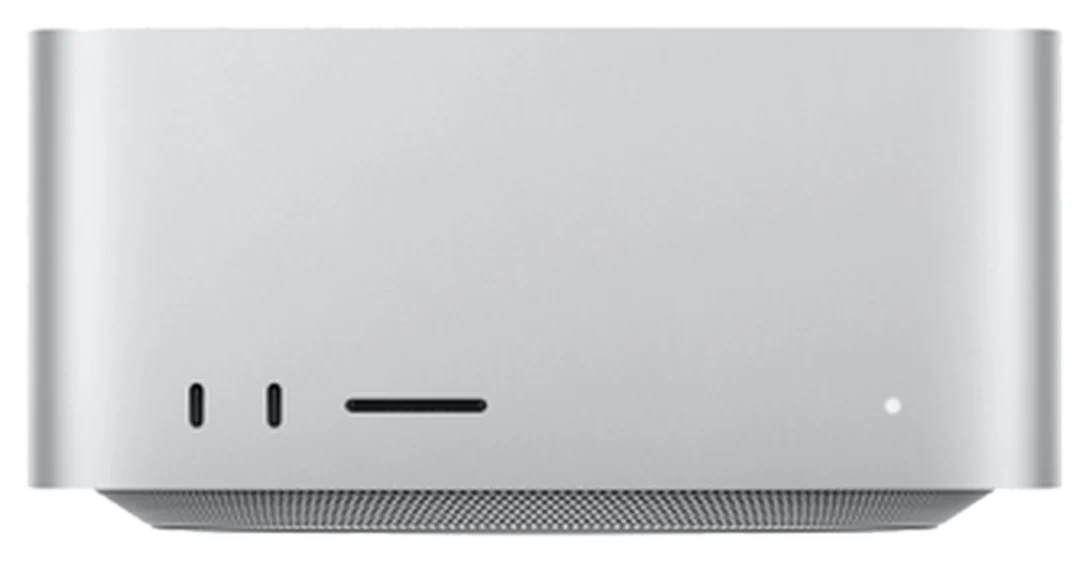
When an open AI model is too large for one machine’s memory, there are two paths: rent data-centre GPUs, or link several smaller machines into a cluster. Since macOS 26.2, Apple supports RDMA over Thunderbolt 5 between Macs, and since August 2026 it has promoted clustering directly on the Mac Studio with M5 Ultra. This article explains how a Mac Studio cluster works, how many cables and ports it needs, which software runs on it (distributed MLX, exo), what public test numbers show, how one machine compares with a cluster — and, just as important, when a business does not need a cluster. Note: all of Namtech’s current internal AI packages run on one machine; the multi-machine clusters in this article are a technical reference option. All technical information is sourced and was checked on 24 Sep 2026.
Summary (TL;DR)
- How it works: since macOS 26.2, RDMA over Thunderbolt 5 lets Macs exchange data with low latency; MLX uses it through its JACCL backend, while the ring backend over TCP is the fallback.
- Cabling: JACCL only supports connecting every pair of machines with Thunderbolt 5 cables — 4 machines need 6 cables and 3 ports each. There is no Thunderbolt 5 switch.
- On-site only: RDMA must be enabled with
rdma_ctl enablein Recovery mode and cannot be enabled remotely. - Software: distributed MLX (built into MLX) and exo — an open-source clustering tool that supports RDMA over Thunderbolt 5 since version 1.0.
- Namtech’s packages: Namtech currently deploys each package on one machine; the largest, AI Enterprise, is 1 × Mac Studio M5 Ultra 256GB (machine 300,000,000₫ VAT included; sold and invoiced by Công ty Cổ phần Trạm Năng Lượng Số). A multi-machine cluster is not a standard package — it is only assessed and quoted separately if truly needed.
- Most businesses do not need one: a single Mac Studio M5 Ultra with 96GB or 256GB covers most internal AI needs; a cluster only pays off when the model exceeds one machine’s memory.
- RDMA over Thunderbolt is available from macOS 26.2; the JACCL backend achieves communication latency an order of magnitude lower than the ring backend — per the MLX documentation.
- exo reports tensor-parallel speed-ups of up to 1.8x on 2 devices and 3.2x on 4 devices — per the exo README on GitHub.
- A cluster of 4 Mac Studio M3 Ultra machines (previous chip generation; the current line is M5 Ultra) with 1.5 TB of unified memory ran Qwen3 235B at 32 tokens per second with exo — third-party figures from Jeff Geerling, 18 Dec 2025.
- Apple says a cluster of four Mac Studios delivers up to 3x faster AI inference than one — MacRumors, 26 Aug 2026.
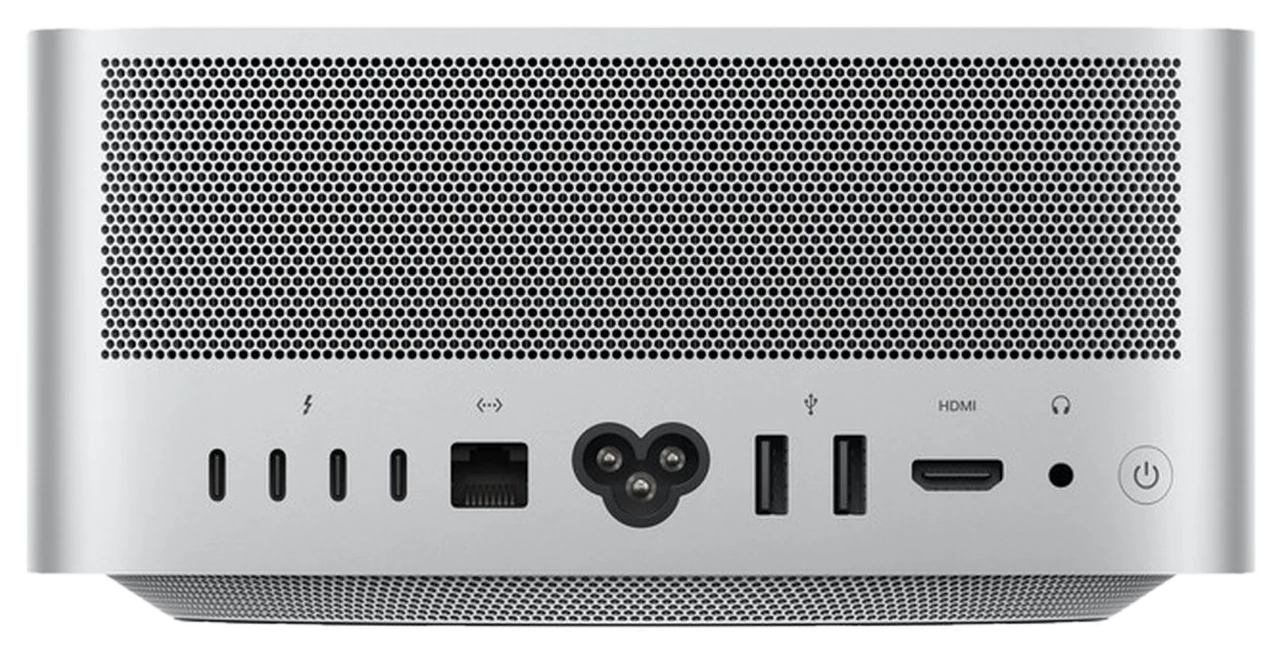
- The Mac Studio M5 Ultra has 6 Thunderbolt 5 ports (4 rear, 2 front); the M5 Max has 4 (Apple specifications).
What is RDMA over Thunderbolt 5?
RDMA (remote direct memory access) lets one machine read or write another machine’s memory directly, without going through the usual TCP/IP network stack, which cuts latency sharply. According to the MLX distributed documentation, starting from macOS 26.2 RDMA over Thunderbolt is available and enables low-latency communication between Macs with Thunderbolt 5; MLX provides the JACCL backend that uses it to reach communication latency an order of magnitude lower than the ring backend.
Why does latency matter for AI? When a model is split across machines, every generated token requires the machines to exchange intermediate results. If each exchange is slow, the whole cluster waits, and adding machines can even make things slower. The MLX documentation states that JACCL is necessary for techniques such as tensor parallelism — splitting each layer of the model across machines so they compute the same token together. Tech blogger Jeff Geerling, who tested a Mac Studio cluster loaned by Apple, writes in his test write-up that RDMA lowers memory access latency from about 300 microseconds to under 50 microseconds.
The ring backend still has a role. According to MLX, ring does not depend on any third-party library, so it is always available; it uses TCP sockets and is usually faster than MPI. Nodes are connected in a ring, so each one only talks to its two neighbours. Its main purpose is to use Thunderbolt rings for more bandwidth than Ethernet. In short: JACCL is the fast path once RDMA is enabled and the cabling is complete; ring is the fallback when RDMA is not enabled or the topology does not qualify.
Apple has made this direction official. In its August 2026 announcement of the Mac Studio with M5 Max and M5 Ultra, the company said users and teams can cluster multiple Mac Studios over Thunderbolt 5 and RDMA to create a large shared memory pool, and that four machines deliver up to 3x faster AI inference than one — as MacRumors reported on 26 Aug 2026. A footnote on Apple’s Mac Studio page says the test used preproduction M5 Ultra systems with a 36-core CPU, 80-core GPU and 512GB, measuring the time to summarise a 32K-token prompt with a 72-billion-parameter dense model via mlx-lm, comparing one system with a fully meshed 4-node cluster. These are the vendor’s numbers under the vendor’s conditions, not a guarantee for every workload.
How many Thunderbolt 5 cables and ports?
Every pair of machines in the cluster needs its own direct Thunderbolt 5 cable, so the cable count grows quickly: n machines need n(n−1)/2 cables and each machine uses n−1 ports. The reason is that MLX states the JACCL backend only supports fully connected topologies — there must be a Thunderbolt cable connecting every pair of Macs directly. exo sets the same condition: devices that want to join an RDMA cluster must be connected to all other devices, and the cables must support Thunderbolt 5.
There is no shortcut through a switch. Jeff Geerling writes that, as far as he can tell, Thunderbolt 5 switches do not exist, so you cannot plug several Macs into one central switch — every Mac has to be connected to every other Mac. He also notes that as of late 2025 he had only seen RDMA clusters of up to four Macs, although Apple said all five Thunderbolt 5 ports on the M3 Ultra Mac Studio are RDMA-enabled. The exo README adds a notable caveat: on a Mac Studio, the Thunderbolt 5 port next to the Ethernet port cannot be used for RDMA.
| Machines in the cluster | Thunderbolt 5 cables | TB5 ports needed per machine | M5 Max (4 TB5 ports, ~3 usable for RDMA*) | M5 Ultra (6 TB5 ports, ~5 usable for RDMA*) |
|---|---|---|---|---|
| 2 machines | 1 | 1 | Enough | Enough |
| 3 machines | 3 | 2 | Enough | Enough |
| 4 machines | 6 | 3 | Just enough | Enough, with spare ports |
| 5 machines | 10 | 4 | Not enough | Enough ports, but no public test seen yet |
*(derived): total Thunderbolt 5 ports per Apple’s specifications (M5 Max: 4 rear; M5 Ultra: 4 rear + 2 front) minus the port next to Ethernet, which the exo README says cannot be used for RDMA on a Mac Studio. That caveat was written for the previous Mac Studio generation; Namtech will re-confirm it on real M5 machines when building a cluster.
The table makes a practical point: a 2-machine cluster has almost no cabling barrier, while a 4-machine cluster already means 6 criss-crossing cables and 3 ports per machine. Jeff Geerling also observes that Thunderbolt plugs do not hold as firmly as the QSFP ports on a DGX Spark, and he doubts the mess of cross-connected plugs would hold up for long in many environments. A cluster should therefore sit in a fixed location, on a shelf or in a tidy cabinet, rather than on a shared desk.
Beyond cables, the documentation lists a few operating conditions. According to MLX, even though TCP/IP is not used with Thunderbolt RDMA, the Thunderbolt Bridge must still be disabled and an isolated local network set up for each Thunderbolt connection; the mlx.distributed_config tool can discover the cabling, check for a valid mesh and generate the configuration commands. According to exo, RDMA ports may fail to discover each other on different macOS versions, so every machine must run exactly the same macOS version, down to beta numbers.
Enabling RDMA: on-site only
This is a big difference from ordinary servers: RDMA over Thunderbolt cannot be enabled remotely. The MLX documentation says that until the feature matures, enabling it cannot be done remotely even with sudo; you have to boot into macOS Recovery, open Terminal from the Utilities menu, run rdma_ctl enable and reboot. You can then verify with ibv_devices. For a 4-machine cluster that means four hands-on procedures, one per machine — a technician has to be there.
Software: distributed MLX and exo
There are two main ways to run a model on a Mac cluster today: use the distributed layer built into MLX directly, or use exo — an open-source layer built on MLX that handles device discovery and model splitting for you. Both share the same foundation: the exo README states that exo uses MLX as its inference backend and MLX distributed for communication between machines.
Distributed MLX suits teams that want fine-grained control: list the machines in a JSON hostfile, choose a backend (ring, JACCL, MPI and others) and launch with mlx.launch. The MLX documentation covers both data parallelism and tensor parallelism. It is flexible, but the operator needs to understand networking and distributed configuration.
exo aims for a simpler experience. According to its README, exo automatically discovers devices running exo with no manual configuration, picks how to split the model based on a real-time view of the cluster topology (each device’s resources and each link’s latency and bandwidth), supports tensor parallelism with up to 1.8x speed-up on 2 devices and 3.2x on 4, and is compatible with common APIs including OpenAI Chat Completions, Claude Messages, OpenAI Responses and Ollama. exo also says it shipped day-0 support for RDMA over Thunderbolt 5, cutting latency between devices by 99%, and its macOS app requires macOS Tahoe 26.2 or later. Jeff Geerling notes that exo 1.0 launched alongside his test (18 Dec 2025), with RDMA for Thunderbolt 5 Mac clusters as its headline feature, released under the Apache 2.0 licence.
One detail shows Apple itself has acknowledged exo: on Apple’s Mac Studio page (checked 24 Sep 2026), the AI apps section invites users to use exo to cluster multiple AI workstations.
| Option | Runs on | Link between machines | Strengths | Caveats |
|---|---|---|---|---|
| MLX, Ollama, LM Studio | 1 machine | None needed | Simplest; enough for most internal needs | Limited by one machine’s memory |
| Distributed MLX — ring backend | Cluster | TCP (over Thunderbolt or Ethernet), ring topology | Always available; no RDMA needed | Latency an order of magnitude higher than JACCL; neighbours only |
| Distributed MLX — JACCL backend | Cluster | RDMA over Thunderbolt 5, fully connected | Low latency; needed for tensor parallelism | RDMA enabled on-site in Recovery; cable count grows fast |
| exo | Cluster | RDMA over Thunderbolt 5 (via MLX distributed) | Automatic discovery and model splitting; OpenAI/Ollama-compatible APIs | All machines on the same macOS version; TB5 port next to Ethernet unusable on Mac Studio |
What does a third-party 4-machine test show?
The most detailed public test available is Jeff Geerling’s, on 4 Mac Studio M3 Ultra machines — an older chip generation than M5 Ultra — with 1.5 TB of unified memory in total, linked over RDMA/Thunderbolt 5, with hardware loaned by Apple. The figures below are third-party numbers measured on the hardware and software of late 2025; they show a trend, not the speed of an M5 Ultra cluster.
According to Jeff Geerling’s article, exo speeds up as nodes are added and reaches 32 tokens per second with Qwen3 235B on the full cluster; with Kimi K2 Thinking — a 1-trillion-parameter model with about 32 billion parameters active at a time — the cluster still reaches around 30 tokens per second. He also tested DeepSeek V3.1 with 671 billion parameters. Notably, llama.cpp spreads model layers across nodes over RPC, so its performance drops as nodes are added, whereas exo — at the time the only tool he used that supported RDMA — gets faster with more machines.
The other side is documented too. He used prerelease software, many bugs were fixed during testing, and he found RDMA over Thunderbolt still new: when it works it works great, and when it does not, the whole cluster has to be shut down and rebooted. Running HPL over Thunderbolt (TCP, not RDMA) made machines crash and reboot. Managing a Mac cluster has its own friction, such as system upgrades that cannot be run over SSH and require clicking through the UI. He concludes that the bigger question is whether you need a full cluster at all, because a single Mac Studio is already very capable.
One machine or a cluster: comparing M5 Ultra configurations
Namtech currently deploys its largest package, AI Enterprise, on one Mac Studio M5 Ultra 30-core CPU/64-core GPU, 256GB; Namtech has no ready-made cluster package. The 2-machine and 4-machine rows in the table below are only a technical reference option showing how capacity and hardware cost grow — the price shown is number of machines × one machine’s price, not a package price. If a cluster is truly needed, Namtech assesses, test-builds and quotes it separately, without promising capability or speed in advance. Hardware prices are selling prices (sold and VAT-invoiced by Công ty Cổ phần Trạm Năng Lượng Số), VAT included.
The model-size column is an estimate for choosing a configuration, using the same formula as our article on the real cost of running an LLM on-premise: usable memory ≈ 75% of RAM, a 4-bit model ≈ 0.5 bytes per parameter, with 20% reserved for context — applied to the cluster’s total RAM. It is a theoretical capacity ceiling that does not subtract the overhead of splitting a model across machines, and it is not a speed measurement.
| Option | Total RAM | Max model size (4-bit, estimate)* | Hardware price | When to choose it |
|---|---|---|---|---|
| 1 × M5 Ultra 96GB | 96GB | ~115 billion parameters | 177,780,000₫ | Internal assistant, RAG, mid-size models |
| 1 × M5 Ultra 256GB (AI Enterprise package) | 256GB | ~307 billion parameters | 300,000,000₫ | Whole company, large models, still the simplicity of one machine |
| 2-machine cluster — 2 × M5 Ultra 256GB (reference) | 512GB | ~614 billion parameters | 600,000,000₫ (2 × 300,000,000₫) | The model you need exceeds 256GB; just 1 Thunderbolt 5 cable, easiest to build |
| 4-machine cluster — 4 × M5 Ultra 256GB (reference) | 1TB | ~1,228 billion parameters | 1,200,000,000₫ (4 × 300,000,000₫) | Very large models (hundreds of billions to a trillion parameters); 6 cables, needs a fixed location |
*Namtech estimate, not a benchmark: usable memory ≈ RAM × 0.75 (the share macOS gives the GPU by default) per machine, a 4-bit quantised model ≈ 0.5 bytes per parameter, 20% reserved for context; distribution overhead not included. Corresponding list prices (before discount): 180,480,000₫ · 304,560,000₫ · 609,120,000₫ · 1,218,240,000₫. The machines are sold and VAT-invoiced by Công ty Cổ phần Trạm Năng Lượng Số; Namtech advises on the configuration and installs the software. For a cluster, software, deployment and maintenance are only quoted after an assessment.
The most notable jump in the table is not from a 2-machine to a 4-machine cluster, but from the 96GB machine to the 256GB machine: capacity nearly triples while it remains one machine, with no cables, no RDMA to enable and no macOS versions to keep in sync. So if you are weighing a cluster of two 96GB machines, compare it first with one 256GB machine — see both configurations side by side on the Mac comparison page.
On power, Namtech’s cost article cites Apple’s figure: a Mac Studio M5 Ultra draws up to about 385W for the whole machine. It follows that a 4-machine cluster running flat out has a ceiling of roughly 1.54 kW (derived: 4 × 385W); plan the power supply and a UPS for the whole cluster when choosing its location. Apple has also announced that a 512GB M5 Ultra will launch in late October 2026, with no price yet; once available, one 512GB machine may replace a 2-machine 256GB cluster for many needs.
When do you NOT need a cluster?
Most businesses do not need a cluster. All of Namtech’s internal AI packages are one machine: AI Box (Mac Studio M5 Max 64GB) and AI Pro (M5 Max 128GB) run open Qwen models (Qwen3.8-27B alongside Qwen3.6-35B-A3B) for internal assistants, document Q&A and RAG, through MLX, Ollama or LM Studio; the AI Enterprise package uses one M5 Ultra 256GB machine — estimated at up to about 307 billion parameters at 4-bit, still in one box. The specific models per package are in the AI models section on the home page. A cluster only pays off when the model you must use is larger than that.
Weigh three limitations before deciding. First, cabling: a fully connected cluster’s cable count grows quadratically — 4 machines already need 6 cables, with no switch to consolidate them. Second, on-site setup: RDMA can only be enabled in Recovery on each machine, and every machine must run the same macOS version, so every reinstall or upgrade needs a technician on site and a coordinated update plan. Third, distribution overhead: the machines exchange data constantly, so 4 machines are not 4x faster — exo reports up to 3.2x and Apple states up to 3x in its own testing.
Remember that what a Mac cluster solves is memory capacity — loading very large models on-site. If your real need is serving many concurrent users, batch processing or training models, revisit the Apple Silicon vs GPU analysis in our guide to choosing internal AI hardware before choosing a cluster.
How does Namtech build a Mac Studio cluster?
Namtech follows a measure first, commit later principle: for every customer considering a cluster, we identify the model to run and the expected load, build and measure on that model before confirming the configuration, and do not promise any speed figure before measuring. All of Namtech’s current packages run on one machine; if the results show one 256GB machine (the AI Enterprise package) is enough, we will recommend one machine.
If a cluster is truly needed after the assessment, the expected work covers: planning the location and Thunderbolt 5 cabling for a fully connected topology, enabling RDMA on-site on each machine, aligning macOS versions, configuring the network for each link, installing distributed MLX or exo, and exposing an OpenAI-compatible API so internal applications can use the cluster as a single AI server. The machines are sold and VAT-invoiced by Công ty Cổ phần Trạm Năng Lượng Số; Namtech advises on the configuration, installs and operates it. See every configuration and price on the Mac Studio page.
Clustering Mac Studios over RDMA/Thunderbolt 5 lets you load models larger than one machine’s memory right in your office, but it costs you extra cables, on-site setup and distribution overhead — so choose a cluster only when the model truly needs it, and measure before you buy.
Frequently asked questions (FAQ)
Why cluster several Mac Studios for AI?
To run open models that are too large for one machine’s memory. The machines are linked over Thunderbolt 5 and share the computation; since macOS 26.2, RDMA over Thunderbolt gives much lower latency between machines than sending data over TCP. If a model fits in one machine, a single machine is usually the simpler and more efficient choice.
How many Thunderbolt 5 cables does a cluster need?
MLX’s JACCL backend only supports fully connected topologies, so the cable count is n(n−1)/2 and each machine needs n−1 ports: 2 machines need 1 cable, 3 need 3 and 4 need 6. According to the sources we read, there is no Thunderbolt 5 switch to connect them to a central point yet.
Can RDMA be enabled remotely?
No. According to the MLX documentation, RDMA over Thunderbolt has to be enabled in macOS Recovery with the command rdma_ctl enable followed by a reboot, and it cannot be done remotely even with sudo. Each machine in the cluster must be handled on-site during setup.
Is a 4-machine cluster four times faster than one machine?
No. exo reports tensor-parallel speed-ups of up to about 1.8x with 2 machines and 3.2x with 4; Apple states a cluster of four M5 Ultra Mac Studios is up to 3x faster than one in its own testing. The loss comes from the machines having to exchange data. Namtech builds and measures on the real workload before confirming, and does not promise speeds.
Does Namtech offer a ready-made Mac Studio cluster package?
No. All of Namtech’s current internal AI packages run on one machine; the largest, AI Enterprise, is 1 × Mac Studio M5 Ultra 30-core CPU/64-core GPU, 256GB, with the machine at 300,000,000₫ VAT included (sold and VAT-invoiced by Công ty Cổ phần Trạm Năng Lượng Số). A multi-machine cluster is only a technical reference option: hardware scales with the number of machines (for example, two 256GB machines are 600,000,000₫), while software, deployment and maintenance are only assessed and quoted separately if truly needed.
Which businesses do not need a cluster?
Most of them. A single Mac Studio M5 Ultra with 96GB (estimated up to ~115 billion parameters at 4-bit) or 256GB (estimated up to ~307 billion) is enough for internal assistants, document Q&A and RAG with models such as Qwen and Gemma. A cluster only makes sense when the model you need genuinely exceeds one machine’s memory.
One machine or a cluster? Measure first, then decide
Namtech helps you pin down the model you need, builds and measures it on Mac Studio, and only then recommends the right single-machine package, or assesses a cluster option separately if truly needed — including installation of MLX, exo, Ollama or LM Studio and on-site operation.
Book a free consultationNote: This article compiles public sources checked on 24 Sep 2026; the Namtech internal AI package details were updated on 1 Oct 2026, machine prices on 18 Oct 2026. The M3 Ultra cluster speed figures are third-party numbers (Jeff Geerling, Dec 2025) on an older chip generation and do not represent an M5 Ultra cluster; the “3x” figure is Apple’s own test under its conditions. Model sizes are estimates based on memory capacity, not benchmarks. Machine prices are selling prices including VAT (sold and invoiced by Công ty Cổ phần Trạm Năng Lượng Số) and change with Apple’s list prices. For reference only; not technical or investment advice.
- MLX — Distributed Communication (RDMA over Thunderbolt from macOS 26.2, JACCL/ring backends, rdma_ctl enable in Recovery, fully connected requirement) — accessed 24 Sep 2026
- exo-explore/exo on GitHub — README (RDMA over Thunderbolt 5, 1.8x/3.2x tensor parallel, port and macOS version caveats) — accessed 24 Sep 2026
- Jeff Geerling — 1.5 TB of VRAM on Mac Studio: RDMA over Thunderbolt 5 (18 Dec 2025) — accessed 24 Sep 2026
- MacRumors — New Mac Studio Can Be Clustered Together for Faster AI Performance (26 Aug 2026) — accessed 24 Sep 2026
- Apple — Mac Studio page (exo mention, 4-node cluster test footnote) and Mac Studio technical specifications (Thunderbolt 5 port count) — accessed 24 Sep 2026
- Apple Newsroom — Apple introduces new Mac Studio with M5 Max and M5 Ultra (Aug 2026) — accessed 24 Sep 2026