Featured project · Reference design
Reference design for an accounting software company in AustraliaThis is a proposed design for illustration; figures are estimates from published specifications, not measurements at a client site.

A 5-Mac Studio on-premise AI cluster for an accounting software company

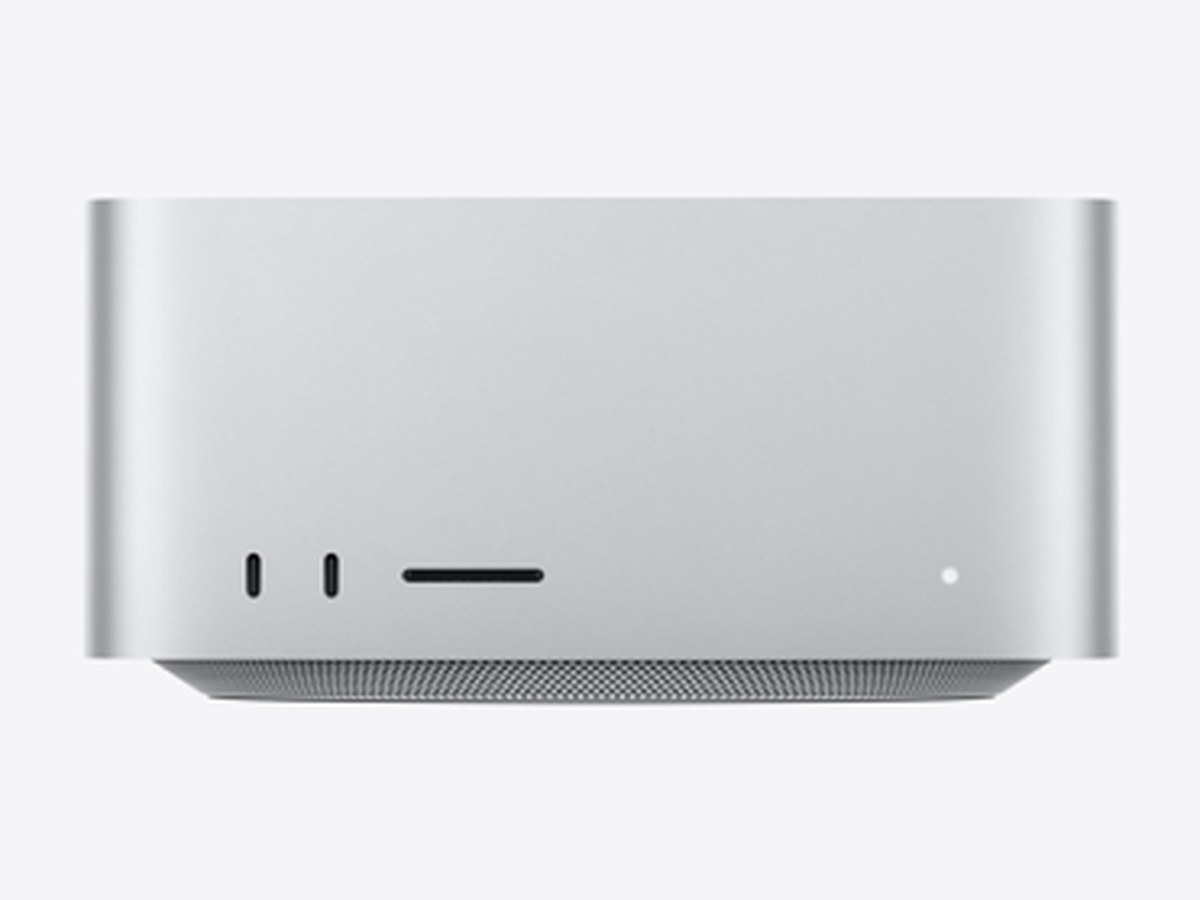
The design uses 5 Mac Studio M5 Ultra machines (30-core CPU / 64-core GPU, 96GB), 480GB of unified memory in total. Estimated maximum power for the 5 machines is 1,925W (using a 385W ceiling per machine). With the default settings, the equipment heat load is about 8,086 BTU/h, or ~2.37 kW of cooling for the equipment alone. Drag the load slider below to watch the machines heat up and the cooling requirement grow.

5 × M5 Ultra 96GB480GB total memory1,925W ceilingData stays in the office
5 network cables to the switch1,975 W · 8,086 BTU/h · 2.37 kW

Drag to rotate · scroll or pinch to zoom · tap a machine to see its specs

Illustrative 3D scene: 5 Mac Studios in a row on the desk; the lower shelf holds a 10GbE switch. "RDMA cluster" mode shows 10 Thunderbolt 5 cables linking every pair of machines directly; "10GbE LAN" mode shows 5 network cables from each machine to the switch. A wall-mounted air conditioner behind blows air toward the desk. The label on each machine shows power (W) and heat load (BTU/h) at the selected load; the label next to the air conditioner shows the total.

The hypothetical brief of an accounting software company

Assume an accounting software company in Australia with about 80 staff: accountants, a customer support team, developers and operations. The company wants to use AI in daily work but does not want to send its clients' financial data to external AI services.

The design therefore runs the AI models inside the office, on machines the company owns. Data does not leave the internal network. Staff use an internal chat interface or an OpenAI-compatible API.

Tasks AI could help with (suggestions)

AI can be wrong. For accounting and tax work, AI output is only a draft; a qualified person must check it before use.

Proposed architecture: two connection options

All 5 machines are identical: Mac Studio M5 Ultra 30CPU 64GPU 96GB 1TB. The options differ in how the machines are linked and how models run.

A. RDMA cluster (Thunderbolt 5)B. 10GbE LAN + load balancing
How models runAll 5 machines run one large model, distributedEach machine runs its own model for one team / department
ConnectionRDMA over Thunderbolt 5 (macOS 26.2 and later), every pair of machines linked directly, no switchOne cable per machine to a 10GbE switch (built-in 10Gb Ethernet port)
Cluster cables10 Thunderbolt 5 cables (5×4÷2)5 network cables
Thunderbolt 5 ports per machineUses 4 of 6 ports (M5 Ultra has 6: 4 rear + 2 front)Not used for the cluster
Memory for models~360GB usable by GPU across the cluster → in theory up to ~576B parameters (4-bit, before distribution overhead)~72GB per machine → models up to ~115B parameters (4-bit, estimate)
If one machine failsThe distributed model stops until reconfiguredOnly that team is affected; the load balancer shifts to other machines
Office network accessStill needs 10Gb Ethernet to a switch for staff to connectBuilt in via the switch

A. RDMA cluster over Thunderbolt 5

Pros

  • Runs models larger than a single machine (96GB) can hold.
  • No Thunderbolt switch needed: cables link each pair directly.

Cons

  • Needs 10 cables; the Thunderbolt 5 Pro cable is 1 m long, so the 5 machines must sit close together.
  • More complex to operate: RDMA is enabled on site (rdma_ctl enable in Recovery), distributed inference runs on MLX.
  • If one machine stops, the whole model stops.
  • Real-world speed not yet measured — Namtech does not promise tokens per second before testing on your model.

B. 10GbE LAN, one model per machine (recommended for 96GB)

Pros

  • Simple and easy to maintain: each machine restarts independently.
  • Each department gets a model suited to its work.
  • Can be pooled behind a load balancer so all 5 machines serve everyone.

Cons

  • Each model must fit on one machine (~115B parameters at 4-bit, estimate).
  • Requires a 10GbE switch and network cables.

With 96GB machines, option B is more practical for most office tasks. Option A suits cases that truly need a model larger than one machine can hold.

Usable memory and model size are estimates: by default macOS lets the GPU use ~75% of memory; a 4-bit model is ≈ 0.5 bytes per parameter, with 20% reserved for context. Not benchmark measurements.

Calculator: power, cooling and workload

Adjust the fields below. Results update instantly, including in the 3D model. Every output is an estimate.

Power and cooling

Per machine
385 W · 1,314 BTU/h
5 machines
1,925 W · 6,568 BTU/h
Equipment (machines + network)
1,975 W · 6,739 BTU/h
Heat load incl. margin estimate
8,086 BTU/h
Cooling capacity needed (equipment only) estimate
2.37 kW
Rated PSU capacity, 5 machines (480W each)
2,400 W
Energy per month estimate
1,422 kWh
Electricity cost per month estimate
3,134,181 (tariff currency)

This is the heat load of the equipment only. An HVAC engineer must also account for room size, occupants, sun exposure and insulation. 1 W = 3.412 BTU/h; 1 kW of cooling = 3,412 BTU/h.

Rated PSU capacity (480W per machine) is what an electrician uses to size outlets, breakers and a UPS; it is not the typical draw.

Workload and staff served

Daily AI users estimate
56
Questions per day estimate
1,120
Answer tokens per day estimate
560,000
Peak-hour load estimate
140,000 token/h
5-machine cluster capacity estimate
1,440,000 token/h
Cluster utilisation (peak hour) estimate
9.7%
Max staff at ≤ 70% load estimate
~576

Only answer tokens are counted. Reading input documents (long RAG context) also uses compute, so Namtech measures both when testing for real.

Suggested split by department (option B)

Each machine runs a model suited to one group of tasks:

  1. Unit 1AccountingRegulation lookup, document reconciliation~115 staff per machine (estimate)
  2. Unit 2Customer supportDraft replies to support tickets~115 staff per machine (estimate)
  3. Unit 3DevelopersCoding help, review, writing tests~115 staff per machine (estimate)
  4. Unit 4Internal docsQ&A over the document base (RAG)~115 staff per machine (estimate)
  5. Unit 5StandbyTakes load while another unit is serviced~115 staff per machine (estimate)

Or pool them behind a load balancer

All 5 machines run the same model; a load balancer routes each request to a free machine. When one machine is serviced, the other 4 keep serving.

Default calculation

5 × 385 W = 1,925 W

1,925 W × 3.412 = 6,568 BTU/h

(1,925 W + 50 W) × 3.412 = 6,739 BTU/h

6,739 × (1 + 20%) = 8,086 BTU/h

8,086 ÷ 3,412 ≈ 2.37 kW

Investment table

Two groups: hardware sold by Namtech (from Namtech's current price list, VAT included) and supporting equipment (reference retail prices in Vietnam, checked 24/09/2026). Prices in VND, VAT included (Vietnam). Software and deployment are quoted separately.

ItemQtyUnit priceAmountNotes / reference models
Hardware sold by Namtech (selling price, VAT included)
Mac Studio M5 Ultra 30CPU 64GPU 96GB 1TB5
182,400,000₫
Original price 192,000,000₫
VAT included
912,000,000₫
Original price 960,000,000₫
VAT included
30 CPU / 64 GPU · 96GB · 1TB
Thunderbolt 5 (USB‑C) Pro Cable (1m)10 (option A only)
2,130,000₫
Original price 2,240,000₫
VAT included
21,300,000₫
Original price 22,400,000₫
VAT included
Thunderbolt 5 (USB‑C) Pro Cable (1m)
Supporting equipment — Reference retail prices in Vietnam, checked 24/09/2026 (not sold by Namtech)
10GbE switch18,650,000₫ – 20,258,000₫8,650,000₫ – 20,258,000₫TP-Link TL-SX1008 (unmanaged) — 8,650,000₫ · 8 × 10G RJ45, VAT included per store pageMikroTik CRS312-4C+8XG-RM (managed) — 20,258,000₫ · 8 × 10G RJ45 + 4 × 10G combo, 1U rackNeeds ≥ 5 × 10GbE RJ45 ports for the 5 machines + 1 uplink to the office network. Range: unmanaged → managed.
Cat6A patch cable, 2 m660,000₫360,000₫Ugreen 70334 Cat6A 2 m — 60,000₫ · slim 32AWG; store page does not state VAT5 cables for the machines + 1 uplink. Cat6A is recommended for 10GbE.
Online UPS, 3kVA118,699,000₫ – 21,590,000₫18,699,000₫ – 21,590,000₫Santak C3K (LCD) 3kVA/2.700W — 18,699,000₫ · online, 3kVA / 2.7kWAPC Easy UPS On-Line SRV3KI-E 3kVA/2.700W — 21,590,000₫ · online, 3000VA / 2700W; listed as pre-orderPeak load ~1,975W (5 machines at the ceiling + switch); a 2,700W UPS runs at ~73%, leaving ~27% headroom.
Wall-mounted inverter air conditioner16,690,000₫ – 12,490,000₫6,690,000₫ – 12,490,000₫1 HP class (~9,000 BTU/h) for a calculated load of ≈ 0.90 HPDaikin Inverter 1 HP ATKB25YVMV — 11,090,000₫ · 9,200 BTU/hPanasonic Inverter 1 HP CU/CS-PU9AKH-8 — 12,490,000₫ · 9,040 BTU/hLG Dual Inverter 1 HP IEC09M2 — 10,990,000₫ · 9,300 BTU/hCasper Inverter 1 HP QC-09IU36A — 6,690,000₫ · 9,500 BTU/hThe room runs 24/7, so an inverter unit is recommended. Prices are the full installation package at Dien May Xanh (per the store page: free installation labour, 4 m of copper pipe included).
Software + deploymentQuoted separately
Namtech hardware — option B
912,000,000₫
Original price 960,000,000₫
VAT included
Namtech hardware — option A
933,300,000₫
Original price 982,400,000₫
VAT included
Supporting equipment (reference prices)34,399,000₫ – 54,698,000₫
Estimated total investment — option B (10GbE LAN)946,399,000₫ – 966,698,000₫
Estimated total investment — option A (RDMA cluster)967,699,000₫ – 987,998,000₫

Total = Namtech hardware + supporting equipment (range from the cheapest to the most expensive model checked). Excludes software and deployment (quoted separately) and extra materials if the air-con pipe run exceeds 4 m. Both options need a switch so staff can reach the machines over the office network.

View machine configuration

Namtech hardware prices may change when Apple changes its list prices.

Deployment steps

Time per step depends on the office setup and document volume, so Namtech sets the schedule after the site survey.

  1. SurveyNeeds per department, document types, user count, the room for the machines, power and cooling.
  2. Test on your modelRun the intended model on sample data to measure real tokens per second, replacing the calculator's assumption.
  3. Finalise the designChoose A (RDMA cluster) or B (10GbE LAN), model size, air conditioning and power.
  4. Install and configurePlace machines, run cables, install model runtimes (MLX, Ollama or LM Studio), load documents.
  5. IntegrateSingle sign-on (SSO), internal chat interface, OpenAI-compatible API for existing software.
  6. Train and hand overTrain users, hand over operating procedures, monitor real load and adjust.

No fixed number of days before the survey.

Frequently asked questions

Is this a project Namtech has already delivered?

No. This is a reference design (a proposed design) for an accounting software company in Australia, used to illustrate the calculations. Figures are estimates from published specifications, not measurements at a client site.

Why 5 M5 Ultra machines with 96GB?

Five machines let you split work by department and still keep a spare while one is serviced. Each 96GB machine can run models up to about 115 billion parameters at 4-bit quantisation (estimate). Total memory across the cluster is 480GB.

How much cooling is needed?

With the defaults (5 machines × the 385W ceiling, an assumed 50W switch, 20% margin), the equipment heat load is about 8,086 BTU/h, or ~2.37 kW of cooling (1 kW = 3,412 BTU/h). This is the equipment only; an HVAC engineer must add room size, occupants and sun exposure.

How much electricity does it use per month?

Running 24 hours a day for 30 days at the ceiling: 1,975W × 720 hours ≈ 1,422 kWh. Real usage is lower because the machines do not run at the ceiling all day. Enter your local tariff in the calculator to see the cost.

How many staff can the 5-machine cluster serve?

Not measured yet. With an illustrative assumption of 80 tokens/second per machine and the default usage pattern in the calculator, the cluster serves about 576 staff at no more than 70% load. Real speed depends on the model and document length, so Namtech measures on your model before anything is finalised.

What does the hardware cost?

5 × 182,400,000₫ = 912,000,000₫ (prices in VND, VAT included, Vietnam). The RDMA cluster option needs 10 extra Thunderbolt 5 Pro 1 m cables, 21,300,000₫ in total. Supporting equipment (10GbE switch, Cat6A cables, UPS, 1 HP air conditioner) at reference retail prices in Vietnam, checked 24/09/2026, comes to about 34,399,000₫ – 54,698,000₫; Namtech does not sell these items. The estimated total investment for option B is about 946,399,000₫ – 966,698,000₫. Software and deployment are quoted separately.

Reference price sources

Listed prices at Vietnamese retailers, checked 24/09/2026. Promotional prices can change by day and region. Namtech does not sell this equipment; prices are only for estimating total investment.

Request a quote

Get a Mac Studio quote within 1 business day

Tell us what you plan to use AI for and how many people will use it — Namtech will recommend a configuration that fits your needs, with no overselling.

We reply within 1 business day. No spam, and we never share your information.